
Introduction
Most “slow Laravel apps” are not short on server power. They are busy doing the wrong work in the wrong place.
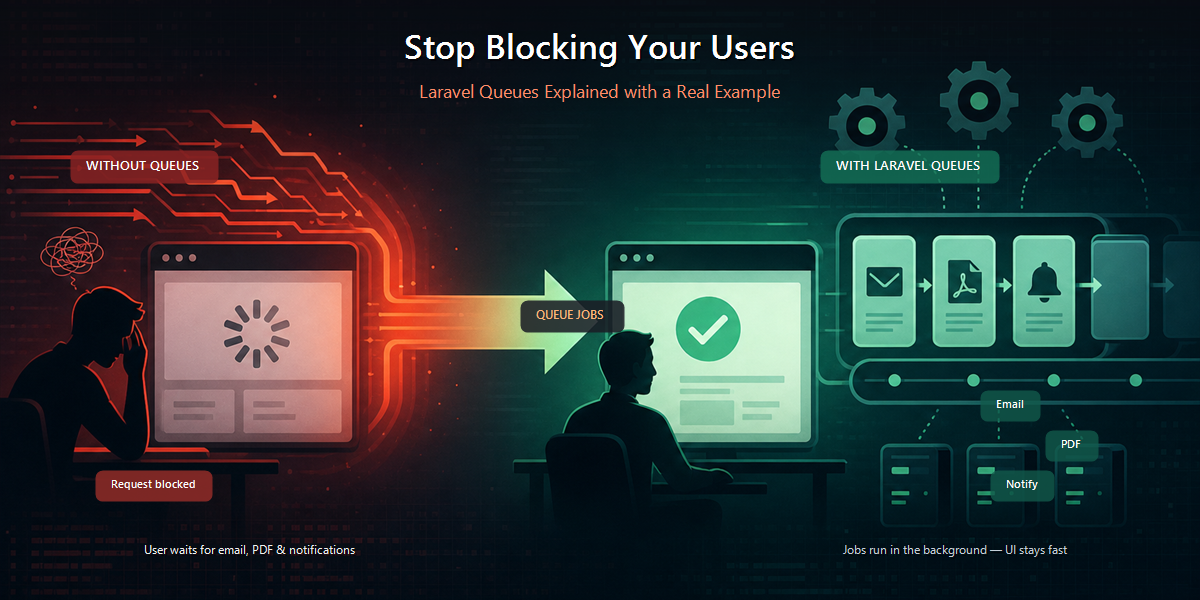
A checkout that sends an invoice email, builds a PDF, and calls an accounting API before redirecting can easily take several seconds. The order was already saved, and the user was already done, yet the request kept working anyway.
Laravel Queues exist to solve that problem: keep the HTTP response lightweight and move time-consuming tasks into background jobs. This piece walks through why that split matters, how the pieces fit together, and what the code is actually doing in a real invoice-email flow.
What Laravel Queues change
A queue is simply deferred work. Your app places a background job on a list, and a worker process picks it up later and runs it.
That may sound like a small change, but in practice it completely changes how you structure your controllers. The request becomes responsible for decisions and persistence. The background job becomes responsible for side effects—mail, files, webhooks, and slow integrations.
A useful rule: if the user does not need the result to see the next screen, it probably should not block the response.
Common tasks that are well suited for queues include:
- Emails and SMS
- PDF and report generation
- Image processing
- Third-party API calls
- Imports, exports, and cleanup
Tasks that should usually not be queued include: validation, authentication, authorization, and any payment confirmation the success page depends on. Those still belong in the request.
The cost of doing everything inline
public function store(OrderRequest $request)
{
    $order = Order::create($request->validated());

    Mail::to($order->customer_email)->send(new InvoiceMail($order));
    $order->generatePdf();
    $this->notifyAccounting($order);

    return redirect()->route('orders.show', $order);
}
Order::create() is fine here—the success page needs a real order. Everything after it is optional from the user’s point of view, yet the browser still waits for all of it.
Latency adds up, and failures become harder to manage. If SMTP times out after the order is saved, the user may see an error for work that already succeeded. You end up with a paid order and a confused customer.
A cleaner approach is to let the request do only what it needs to do:
public function store(OrderRequest $request)
{
    $order = Order::create($request->validated());

    SendInvoiceEmail::dispatch($order);

    return redirect()->route('orders.show', $order);
}
Calling dispatch() does not send the email immediately. It records a background job for a worker. The redirect can return while the email is still pending. That is the whole point.
Choosing where background jobs live
In .env:
QUEUE_CONNECTION=databaseThe Database driver is a solid default while you are learning the flow or shipping a small app. Under real traffic, Redis is usually the better choice:
QUEUE_CONNECTION=redisThe sync driver can be misleading. It keeps the job syntax but runs everything inside the request, so you get none of the performance benefit.
With the Database driver, you also need storage for pending and failed work:
php artisan queue:table
php artisan queue:failed-table
php artisan migrate
The jobs table holds what still needs to run. The failed_jobs table holds what gave up after retries. Without those tables, Database queues have nowhere to write.
The job itself
php artisan make:job SendInvoiceEmail<?php
namespace App\Jobs;
use App\Mail\InvoiceMail;
use App\Models\Order;
use Illuminate\Bus\Queueable;
use Illuminate\Contracts\Queue\ShouldQueue;
use Illuminate\Foundation\Bus\Dispatchable;
use Illuminate\Queue\InteractsWithQueue;
use Illuminate\Queue\SerializesModels;
use Illuminate\Support\Facades\Mail;
class SendInvoiceEmail implements ShouldQueue
{
use Dispatchable, InteractsWithQueue, Queueable, SerializesModels;
public int $tries = 3;
public int $backoff = 30;
public function __construct(public Order $order)
{
}
public function handle(): void
{
Mail::to($this->order->customer_email)
->send(new InvoiceMail($this->order));
}
}ShouldQueue is the switch. With it, Laravel pushes the background job onto the queue. Without it, the same dispatch path tends to run immediately.
The traits are less mysterious than they look:
Dispatchablegives youSendInvoiceEmail::dispatch()Queueablegives you->delay()and->onQueue()InteractsWithQueuegives you controls like$this->fail()SerializesModelsstores the order ID, then reloads a fresh model when the worker runs
That last one matters. The worker should not depend on an old in-memory object from the original request. It should read current data.
The constructor’s public Order $order is property promotion: one line both accepts and stores the model. $tries and $backoff say “try three times, wait 30 seconds between attempts.” Temporary mail or API failures often recover; permanent bad data will not, which is why failure handling later matters.
For growing delays:
public array $backoff = [30, 60, 120];handle() is the worker’s entry point. Everything expensive belongs here, not in the controller.
Dispatch is a design choice
SendInvoiceEmail::dispatch($order);

SendInvoiceEmail::dispatch($order)->delay(now()->addMinutes(2));

SendInvoiceEmail::dispatch($order)->onQueue('emails');

SendInvoiceEmail::dispatchSync($order);
Plain dispatch() is the default path. Delay is for reminders and “send after settle” behavior. Named queues let mail stay responsive while heavy reports wait their turn. dispatchSync() is for moments when you deliberately want the old blocking behavior—usually tests or debugging.
Named queues only help if the worker listens in the right order:
php artisan queue:work --queue=emails,defaultLeft to right is priority: emails first, everything else second.
Queue workers are an essential part of the feature
Dispatching a job only places it on the queue. A queue worker turns it into work.
php artisan queue:workLocally, queue:listen is slower but friendlier while code is changing. In production, long-running queue:work processes under Supervisor (or similar) are the norm:
php artisan queue:work redis --queue=emails,default --tries=3 --timeout=90--timeout protects you from hung PDF or API calls. And after every deploy:
php artisan queue:restartWorkers keep code in memory. If you forget to restart them, they keep running yesterday’s logic. When “queues do nothing,” the first check is still the simplest one: is a worker actually running?
A real flow: invoice email after order
Here is the same idea in a checkout-shaped example.
Controller
<?php

namespace App\Http\Controllers;

use App\Http\Requests\OrderRequest;
use App\Jobs\SendInvoiceEmail;
use App\Models\Order;

class OrderController extends Controller
{
    public function store(OrderRequest $request)
    {
        $order = Order::create([
            'customer_name' => $request->customer_name,
            'customer_email' => $request->customer_email,
            'total' => $request->total,
            'status' => 'paid',
        ]);

        SendInvoiceEmail::dispatch($order)->onQueue('emails');

        return redirect()
            ->route('orders.show', $order)
            ->with('success', 'Order placed. Invoice email is on the way.');
    }
}
The request still owns validation and persistence. The copy matters too: “on the way” tells the truth about async work. “Email sent” often does not.
Mailable
<?php

namespace App\Mail;

use App\Models\Order;
use Illuminate\Bus\Queueable;
use Illuminate\Mail\Mailable;
use Illuminate\Mail\Mailables\Content;
use Illuminate\Mail\Mailables\Envelope;
use Illuminate\Queue\SerializesModels;

class InvoiceMail extends Mailable
{
    use Queueable, SerializesModels;

    public function __construct(public Order $order)
    {
    }

    public function envelope(): Envelope
    {
        return new Envelope(
            subject: 'Your invoice for order #'.$this->order->id,
        );
    }

    public function content(): Content
    {
        return new Content(
            markdown: 'emails.invoice',
        );
    }
}
envelope() defines the subject. content() points at the Markdown view. Keeping send logic inside the job makes retries and logging easier to reason about than scattering queue behavior across mailables and controllers.
Email view
resources/views/emails/invoice.blade.php:
@component('mail::message')
# Thanks for your order

Hi {{ $order->customer_name }},

Your payment was received. Order ID: **#{{ $order->id }}**
Total: **{{ number_format($order->total, 2) }}**

@component('mail::button', ['url' => url('/orders/'.$order->id)])
View order
@endcomponent

Thanks,<br>
{{ config('app.name') }}
@endcomponent
The mailable’s public $order is available in the view. Laravel’s mail components give you a usable layout without inventing email HTML from scratch.
Failures are inevitable, so prepare for them
public function handle(): void
{
    if (! $this->order->customer_email) {
        $this->fail(new \RuntimeException('Order has no customer email.'));
        return;
    }

    Mail::to($this->order->customer_email)
        ->send(new InvoiceMail($this->order));
}

public function failed(\Throwable $exception): void
{
    logger()->error('Invoice email failed', [
        'order_id' => $this->order->id,
        'error' => $exception->getMessage(),
    ]);
}
Retry temporary failures, but don’t retry invalid data. A missing email will not appear on the next attempt, so $this->fail() stops the loop. failed() is your last hook—logs, alerts, or an email_status column on the order.
php artisan queue:failed
php artisan queue:retry all
php artisan queue:flush
Those commands are how you inspect, recover, or clear the failures you decided to stop caring about.
Patterns that prevent pain later
Sometimes you need the values from dispatch time, not whatever the database says later:
public function __construct(
    public int $orderId,
    public string $email,
) {}

public function handle(): void
{
    $order = Order::findOrFail($this->orderId);

    Mail::to($this->email)->send(new InvoiceMail($order));
}
Duplicate checkout requests are more common than you might expect. Unique jobs help:
use Illuminate\Contracts\Queue\ShouldBeUnique;

class SendInvoiceEmail implements ShouldQueue, ShouldBeUnique
{
    public function uniqueId(): string
    {
        return (string) $this->order->id;
    }
}
And when work has a real sequence—PDF, then email, then accounting—chain it instead of stuffing three responsibilities into one class:
use Illuminate\Support\Facades\Bus;

Bus::chain([
    new GenerateInvoicePdf($order),
    new SendInvoiceEmail($order),
    new NotifyAccounting($order),
])->dispatch();
Later steps run only if earlier ones succeed.
Proving the behavior
use App\Jobs\SendInvoiceEmail;
use App\Models\Order;
use Illuminate\Support\Facades\Queue;

public function test_order_dispatches_invoice_email_job(): void
{
    Queue::fake();

    $order = Order::factory()->create();

    SendInvoiceEmail::dispatch($order);

    Queue::assertPushed(SendInvoiceEmail::class, function ($job) use ($order) {
        return $job->order->is($order);
    });
}
Queue::fake() records jobs without touching Redis or the database. This asserts the right work was queued. Email content belongs in a separate test with Mail::fake() and a synchronous run of the job.
Common mistakes teams make
- No worker running, and a growing pile of untouched jobs
syncleft on in production- Huge payloads instead of IDs
- No timeout around fragile external calls
- Workers not restarted after deploy
- Endless retries for data that will never become valid
In production, Redis, supervised workers, priority queues, failed-job alerts, and deploy-time restarts are not extras. They are how the feature stays trustworthy.
Summary
Laravel Queues are less about learning new syntax and more about creating clear boundaries within your application. The request creates the record and answers the user. The background job handles side effects. The worker keeps that promise over time.
If a screen feels slow, look for mail, PDFs, and API calls still living in the controller. Moving them off the request is often the difference between an eight-second wait and an immediate response.