Series — BigRock Git Deploy (1 of 2+). This post is the Git connection layer (any stack). Next: Part 2 — Laravel after pull. Later posts can cover other stacks the same way (Node, WordPress, static sites).
Introduction
You regenerate a GitHub personal access token for security. Local Git still works. Then you SSH into BigRock, run a pull—and authentication fails. Or worse: you paste a clone URL into the shell and get No such file or directory.
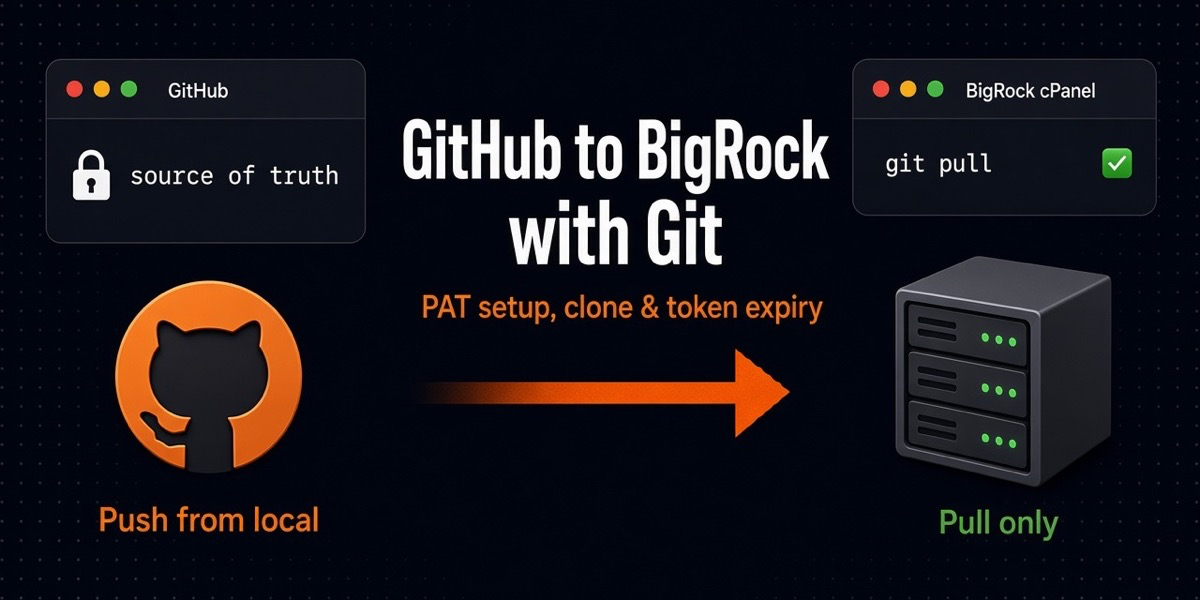
This post is one clear path for the Git plumbing: local Mac/dev → GitHub (source of truth) → BigRock cPanel (live server). You push from your machine. BigRock only pulls. You do not push from production.
We use HTTPS + Personal Access Token (PAT) as the main method (the usual pain when tokens expire). SSH deploy keys are noted as a cleaner long-term option. Examples use placeholders like YOUR_TOKEN—never paste a real token into a blog, chat, or screenshot.
App-specific steps (Composer, Artisan, public/ docroot) live in Part 2 so this guide stays reusable for other technologies.
Architecture (what you are implementing)
- GitHub — holds the code; private or public repo
- Your laptop — develop, commit,
git push - BigRock server — clone once, then
git pull(or cPanel “Update from Remote”)
Roles stay strict: production consumes GitHub; it is not a second remote you push from. That habit stays the same whether the app is Laravel, Node, or a static site.
Prerequisites
- BigRock hosting with SSH / Terminal access (often jailshell)
- cPanel Git Version Control (optional but handy)
- A GitHub repository (this guide assumes private + pull access)
- Basic Git:
clone,remote,fetch,pull
Create auth on GitHub (PAT)
For pull-only deploys on shared hosting, a PAT over HTTPS is the path most people hit first.
Fine-grained vs classic
- Fine-grained token — prefer this when available; limit to one repo and Contents: Read
- Classic token — still common; use the minimum scope needed for private repo pull (typically
repofor classic private access)
Minimum privilege for pull-only deploy
Goal: BigRock can read the repo. It does not need admin, webhook, or delete rights.
- Fine-grained: repository access = that one repo; Contents: Read-only
- Set an expiry (30–90 days is a sane rotation habit)
- Store the token once in a password manager; you will not see it again in full
When to prefer SSH deploy keys instead
If you are tired of rotating PATs in remote URLs, generate an SSH key on the server, add the public key under the GitHub repo → Deploy keys (read-only), and clone with git@github.com:USER/REPO.git. Cleaner long-term; slightly more setup on jailshell hosts. This post stays on PAT because that is what breaks when you regenerate a token.
Connect BigRock to the repo
Find where the project lives
In cPanel Git Version Control, note the repository path (often under your home directory—not always the same as the public web folder). SSH in and cd there before running Git commands.
First-time clone
cd ~/path/to/parent
git clone https://YOUR_GITHUB_USERNAME:YOUR_TOKEN@github.com/YOUR_USER/YOUR_REPO.git
Replace placeholders only. Prefer fine-grained tokens scoped to that repo.
If the repo already exists via the cPanel Git UI, you may skip clone and only fix the remote URL (next section).
Already cloned / token expired
You do not need to re-clone. Update the remote:
cd ~/path/to/YOUR_REPO
git remote set-url origin https://YOUR_GITHUB_USERNAME:YOUR_TOKEN@github.com/YOUR_USER/YOUR_REPO.git
git fetch origin
git pull origin main
Use your real default branch name (main or master).
Common mistake: pasting the URL alone
If you paste this into SSH and press Enter:
https://YOUR_GITHUB_USERNAME:YOUR_TOKEN@github.com/YOUR_USER/YOUR_REPO.gitthe shell treats it like a path/command and you get something like No such file or directory. That is not a GitHub outage. Prefix a real Git command: git clone ... or git remote set-url origin ....
Verify connectivity
git remote -v
git ls-remote origin
If ls-remote lists refs, auth works. If it asks for a password or says authentication failed, the token or username is wrong/expired.
Day-to-day Git flow
- Develop locally
git add/git commitgit push origin main(from your Mac)- On BigRock:
git pullor cPanel Git → Update from Remote - Run your stack’s post-pull steps (see series Part 2+ for each technology)
Keep production pulls boring. Do not develop on the live server.
Token expiry and rotation
Symptoms: git pull / git fetch fails with authentication errors; cPanel “Update from Remote” suddenly breaks after you rotated a token on GitHub.
Fix:
- Revoke the old token in GitHub
- Create a new least-privilege token
- On BigRock:
git remote set-url origin https://USERNAME:NEW_TOKEN@github.com/USER/REPO.git git fetch/git pullto confirm
Security: never paste tokens into chat, tickets, screenshots, or blog posts. Prefer SSH deploy keys or a secret store over leaving PATs in shell history forever. If a token was ever shared, revoke it immediately and create a new one.
Troubleshooting (Git / auth)
| Symptom | Likely cause | Fix |
|---|---|---|
No such file or directory on a GitHub URL |
Ran the URL as a bare shell command | Use git clone or git remote set-url |
| Authentication failed | Expired/revoked/wrong token | New PAT + update origin |
| Permission denied (publickey) | SSH key missing or not authorized | Fix deploy key / SSH agent; or switch to HTTPS PAT |
| Pull works, site unchanged | Wrong folder, app cache, or wrong web root | Confirm path; then follow your stack’s post-pull guide (e.g. Laravel Part 2) |
| Commands blocked / odd paths | jailshell / hosting limits | Stay in allowed dirs; ask host if Git/SSH features are restricted |
Security checklist
- Revoke any token that was ever shared or committed
- Least privilege: read-only Contents for deploy pulls
- Never store a PAT inside the Git repo
- Be careful with HTTPS remotes that embed tokens—they can land in shell history; clear history on shared jump hosts and avoid screenshots
- Prefer a dedicated deploy identity (deploy key or machine user) over your personal admin account when possible
Optional improvements
- SSH deploy key instead of PAT in the remote URL
- GitHub Actions or a webhook-based deploy instead of manual SSH pulls
- Staging subdomain on BigRock to pull/test before production
- Per-stack deploy script (
deploy.sh) that runs pull + app commands—see Laravel Part 2 for an example
Conclusion
GitHub is the source of truth. BigRock only pulls when auth is valid. When a PAT expires, you do not rebuild the universe—you revoke, create a new least-privilege token, update origin, and pull again.
Once Git works, run the steps for your framework. Start here for Laravel: Part 2 — Laravel deploy on BigRock after git pull.
Quick path: create read-only PAT → git clone or git remote set-url → verify with git ls-remote → pull after every push → rotate tokens without panic.
Series navigation: You are on Part 1 (Git setup) · Next: Part 2 (Laravel)