
Introduction
When you configure email in a website, Laravel app, WordPress plugin, or desktop mail client, one setting always appears: SMTP port. Pick the wrong port and messages fail silently, hang on connect, or get blocked by your hosting provider or ISP.
SMTP (Simple Mail Transfer Protocol) is how email is sent from your app or client to a mail server, and how servers relay mail to each other. Different ports exist because the internet evolved—from open relays, to encrypted submission, to workarounds when common ports are blocked.
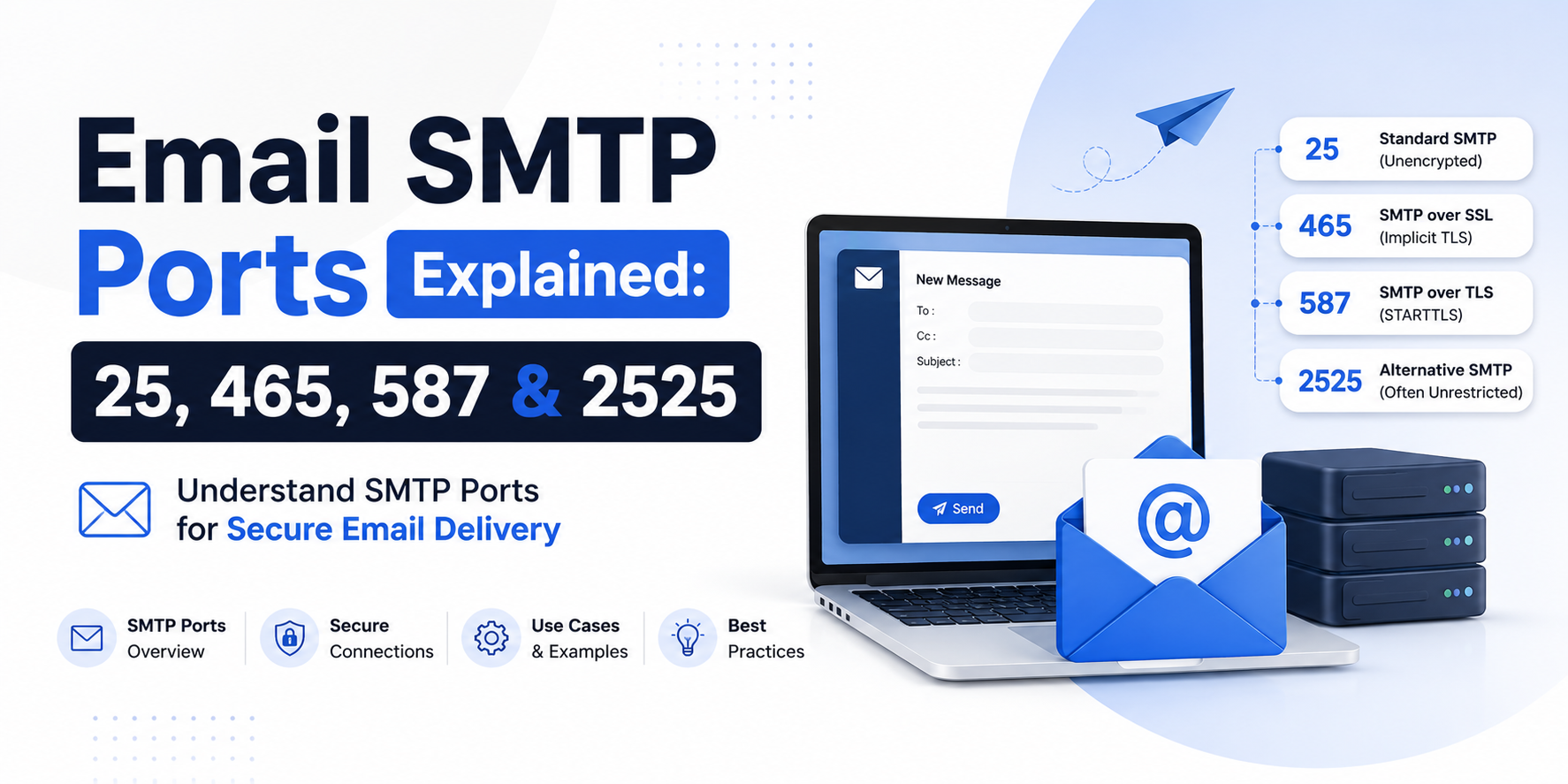
This guide explains the main SMTP ports—25, 465, 587, and 2525—how each one works, when to use it, and how to configure it with practical examples.
SMTP in one minute
Think of email in two directions:
- Sending (SMTP) — your app/client → mail server → recipient servers
- Receiving (IMAP/POP3) — mail server → your inbox app
This article focuses on SMTP ports for sending. Receiving uses different ports (for example IMAP 143/993, POP3 110/995), so do not mix those numbers into your SMTP settings.
A typical SMTP setup needs:
- Host (example:
smtp.gmail.comorsmtp.mailgun.org) - Port (25, 465, 587, or 2525)
- Encryption mode (none, SSL/TLS, or STARTTLS)
- Username and password (or API credentials)
Types of SMTP ports (overview)
Here are the ports you will see most often:
- Port 25 — classic SMTP; mainly server-to-server relay
- Port 465 — SMTP over implicit SSL/TLS (SMTPS)
- Port 587 — message submission with STARTTLS (recommended for apps/clients)
- Port 2525 — alternate submission port used by many providers when 587 is blocked
The port is not just a number. It usually implies how encryption starts and who is allowed to connect.
How encryption ties to the port
Before the port details, understand two encryption styles:
Implicit SSL/TLS (common on 465)
The connection is encrypted from the first byte. Client connects to the port and immediately expects TLS. There is no plain-text greeting first.
STARTTLS (common on 587, sometimes 25)
The connection starts in plain text. The server advertises STARTTLS. The client upgrades the same connection to TLS with a STARTTLS command, then authenticates and sends mail.
If you choose port 587 but set encryption to “SSL” instead of “STARTTLS” (or the reverse on 465), many libraries fail with handshake or timeout errors. Port and encryption mode must match.
Port 25 — classic SMTP relay
How it works
Port 25 is the original SMTP port. Mail servers still use it heavily to deliver mail to other domains (MTA-to-MTA relay). Example: Gmail’s servers talk to Outlook’s servers on port 25 (with modern security controls).
For end-user apps and shared hosting, port 25 is often restricted. Many ISPs and cloud providers block outbound 25 to reduce spam from compromised machines.
When to use port 25
- You run your own mail server and need to receive/relay internet mail from other MTAs
- Server-to-server delivery inside a controlled network where policy allows it
- Not ideal for website contact forms, Laravel apps, or desktop “send mail” accounts on consumer networks
When not to use it
- Sending mail from a web app on shared hosting or common cloud VMs (often blocked)
- Authenticated “mail submission” from Thunderbird, Outlook, or mobile apps (use 587/465 instead)
How to use it (example)
On a self-hosted Postfix/Exim server listening for inbound SMTP:
# Other mail servers deliver to you on:
Host: mail.yourdomain.com
Port: 25
Encryption: opportunistic STARTTLS (if offered)
Auth: usually not used for public MX delivery; trust is based on DNS/IP reputation, SPF, DKIM, DMARC
From an application on a blocked network, this often fails:
telnet smtp.example.com 25
# Connection timed out / Connection refused
Rule of thumb: port 25 is for mail infrastructure, not for your app’s “Send email” settings.
Port 465 — SMTP with implicit SSL/TLS
How it works
Port 465 wraps SMTP inside TLS from the start (sometimes called SMTPS). The client opens a TLS socket to 465, then speaks SMTP commands over that secure channel.
Historically, 465 was assigned, then discouraged in favor of 587 + STARTTLS, then widely used again because it is simple and reliable. Most major providers still support it.
When to use port 465
- Your mail host documents SSL/TLS on 465
- Your client/library is clearer with “SSL” than with STARTTLS
- You want encryption forced immediately (no plain-text phase)
How to use it (examples)
Generic mail client
Outgoing server (SMTP): smtp.yourprovider.com
Port: 465
Encryption: SSL/TLS (implicit)
Authentication: normal password / app password
Username: you@yourdomain.com
Laravel .env example
MAIL_MAILER=smtp
MAIL_HOST=smtp.yourprovider.com
MAIL_PORT=465
MAIL_USERNAME=you@yourdomain.com
MAIL_PASSWORD=your-app-password
MAIL_ENCRYPTION=ssl
MAIL_FROM_ADDRESS=you@yourdomain.com
MAIL_FROM_NAME="${APP_NAME}"
In Laravel, MAIL_ENCRYPTION=ssl paired with port 465 is the usual match for implicit TLS.
Port 587 — message submission (recommended default)
How it works
Port 587 is the standard mail submission port for clients and applications. Designed for authenticated users submitting outbound mail to their provider.
Typical flow:
- Client connects to port 587
- Server greets in plain text and advertises capabilities
- Client sends
STARTTLSand upgrades to TLS - Client authenticates (AUTH LOGIN / PLAIN, etc.)
- Client sends
MAIL FROM,RCPT TO,DATA
Providers expect authentication on 587. That is why it is the right choice for websites, CRMs, and transactional email from your app.
When to use port 587
- Default choice for apps, contact forms, and mail clients
- Provider docs say “SMTP submission” or “STARTTLS”
- You want the modern, standards-friendly submission path
How to use it (examples)
Gmail-style settings (concept)
SMTP host: smtp.gmail.com
Port: 587
Encryption: STARTTLS
Username: your@gmail.com
Password: app password (not your normal login, if 2FA is on)
Laravel .env example
MAIL_MAILER=smtp
MAIL_HOST=smtp.mailgun.org
MAIL_PORT=587
MAIL_USERNAME=your-smtp-user
MAIL_PASSWORD=your-smtp-password
MAIL_ENCRYPTION=tls
MAIL_FROM_ADDRESS=noreply@yourdomain.com
MAIL_FROM_NAME="${APP_NAME}"
Here MAIL_ENCRYPTION=tls means STARTTLS in Laravel’s SMTP transport, which pairs with port 587.
PHPMailer-style options (concept)
$mail->isSMTP();
$mail->Host       = 'smtp.example.com';
$mail->Port       = 587;
$mail->SMTPSecure = PHPMailer::ENCRYPTION_STARTTLS;
$mail->SMTPAuth   = true;
$mail->Username   = 'you@example.com';
$mail->Password   = 'secret';
Port 2525 — alternate submission port
How it works
Port 2525 is not an official “replacement standard” like 587, but many ESPs (Email Service Providers) offer it as an alternate SMTP port. Behavior is usually the same as submission on 587: authenticate, use TLS/STARTTLS, send mail.
Why it exists: some corporate networks or ISPs interfere with 25/465/587. 2525 often remains open, so developers can still send mail from restricted environments.
When to use port 2525
- 587 (or 465) is blocked on your server/network
- Your provider (SendGrid, Mailgun, Brevo, etc.) documents 2525 as supported
- You need a practical workaround without changing hosts
How to use it (example)
MAIL_MAILER=smtp
MAIL_HOST=smtp.sendgrid.net
MAIL_PORT=2525
MAIL_USERNAME=apikey
MAIL_PASSWORD=your-sendgrid-api-key
MAIL_ENCRYPTION=tls
Always confirm encryption mode in your provider’s docs. Most treat 2525 like STARTTLS submission, similar to 587.
Quick decision guide
- Building a website/app that sends email? Start with 587 + STARTTLS (tls)
- Provider says SSL on 465? Use 465 + ssl
- 587 blocked? Try 2525 if your ESP supports it
- Running an MX/mail server for a domain? Port 25 for internet mail exchange—not for your contact form
Real-world troubleshooting
- Connection timeout — port blocked by firewall/ISP/hosting; try 587 ↔ 465 ↔ 2525
- SSL/TLS handshake failed — encryption mode does not match port (ssl on 587, or starttls on 465)
- Authentication required / 535 errors — wrong username/password, or provider requires an app password
- Works locally, fails on server — cloud provider may block outbound 25; switch to authenticated 587/465 via an ESP
- Emails send but land in spam — port is fine; fix SPF, DKIM, DMARC, and from-domain alignment
Minimal test you can run
From your server (if openssl is available):
# Test implicit TLS on 465
openssl s_client -connect smtp.example.com:465 -quiet

# Test STARTTLS on 587
openssl s_client -connect smtp.example.com:587 -starttls smtp -quiet
If the TLS handshake succeeds, the network path and certificate side are likely OK. Then verify username/password in your app.
Conclusion
SMTP ports look like small config details, but they encode decades of email security practice. 25 is for server relay. 587 is the modern default for authenticated submission with STARTTLS. 465 is the implicit SSL/TLS option many hosts still prefer. 2525 is the practical escape hatch when common ports are blocked.
For most Laravel, PHP, and website projects: use a reputable SMTP provider, set port 587 with TLS/STARTTLS, authenticate properly, and only switch to 465 or 2525 when docs or network limits require it. Getting the port and encryption pair right removes a large class of “email not sending” bugs before you ever touch SPF or templates.
Quick checklist: know send vs receive ports → match port + encryption → prefer 587 for apps → use 465 if required → fall back to 2525 when blocked → leave 25 to mail servers.